Subject: "PhotoStory - Devlog #2"
It's been a week since the last update and I thought it was about time I put out another devlog. Most of the features I added in between were very incremental and nothing terribly big. All of these were mostly additions to the backed that didn't add much to the user experience except one of them. I'll go through the new additions I've added in-brief.
Server-side Sessions
After last week's devlog, I wanted to fix a lot of the security issues that I had left a blind-eye towards simply because I wanted to push it out the door. With the nature of the app and the sensitive data it stores, neglecting privacy would be a very foolish mistake. The ultimate goal of this project is to offer end-to-end encryption. Therefore, I've worked on a few key aspects that should hopefully make the app far more secure than before.
The first order of business was to implement proper server-side sessions and their validation. A session is essentially a user's cookie which can hold information and preferences that would be useful for the next time they visit the website. This could be the theme, setting toggles and much more. However, many websites also use cookie data to store user IDs. PhotoStory follows the same approach. With the user_id stored inside cookies, any recurring visits to the websites can easily be verified with Flask's digital signing mechanisms and allow users to maintain persistent log-in states.
Flask by default offers client-side sessions right out of the box. All the data is stored in the user's web browser and each time a request is sent, the browser sends the cookie back to the server. There are some advantages to this approach. It is easier to configure since it is baked into Flask. However, the downside to this is that the cookies are only digitally signed to prevent tampering and any data stored is visible to attackers.
However, there is a second approach to this. PhotoStory has implemented server-side sessions to make it easy to revoke access and give more fine-tuned control. Now the cookie data that would be sent to the browser is actually stored locally using Cachelib and a simple lookup can be performed during the running of the program to help maintain the same persistence. The biggest advantage of this is privacy, since all the data doesn't have to leave the server anymore.
Also, session expiration is now controlled by the server automatically. The server doesn't have to check in with a client's cookie each time to find out at what time it expires. It mitigates any risks associated with browser modifications to extend lifetimes though this is not possible and already countered even with client-side sessions through Flask's highly secure digital signing.
End-to-end Encryption
With the latest set of patches and features, It's far more easier to keep your data yours by encrypting it. There are two parts to this - encryption during transit and encryption during rest. Let's tackle encryption during rest first. This was implemented using a simple symmetric key cipher. I opted for AES-GCM with a 256-bit key by default. AES-GCM is useful because it offers authentication as well as it checks the integrity of data and prevents tampering.
So now, if you share a server or computer with someone, they won't be able to see the contents of your images. Again, it makes the security far more centralised and easier to control. Also, encryption at rest is optional. If it doesn't detect a key present in the .env file, it won't use it. The nonces are also prepended to the file now; the first 12 bytes are just relegated to the nonce storage with the remainder ciphertext used for decryption.
Regarding encryption during transit, this was more easier to tackle. The most obvious approach is to use HTTPS w/ TLS. Battling HTTPS from both the frontend and backend is extremely tedious and would make things far more complicated since there would be issues with cookies sent between different origins. The easiest way to mitigate this would be to use a reverse proxy such as Caddy or Nginx. These act as 'routers' for HTTP traffic and neatly abstract away the backend, allowing you to route different requests to different servers but with the same origin.
The certificates for TLS can be handled by the reverse proxy while the backend and frontend can still use HTTP on it's own because the protocol is no longer of concern. This does add a little bit of overhead but it is a far better choice because something like Nginx can serve the Svelte files that are built directly without any problems whatsoever. There is some tinkering that needs to be done regarding fowarding cookies and such data but that is not impossible to solve. Once I start writing the set-up guide, I will hopefully leave the configuration files for others to use as well.
Date Grouping
I think this was the problem that I mentally had to wrap my head around the most. It was a little bit tricky to solve initially but I just kind of patted my way through the dark solving it. The backend would essentially send the image ID and the date taken as a key value pair and I somehow had to find a way to club those together.
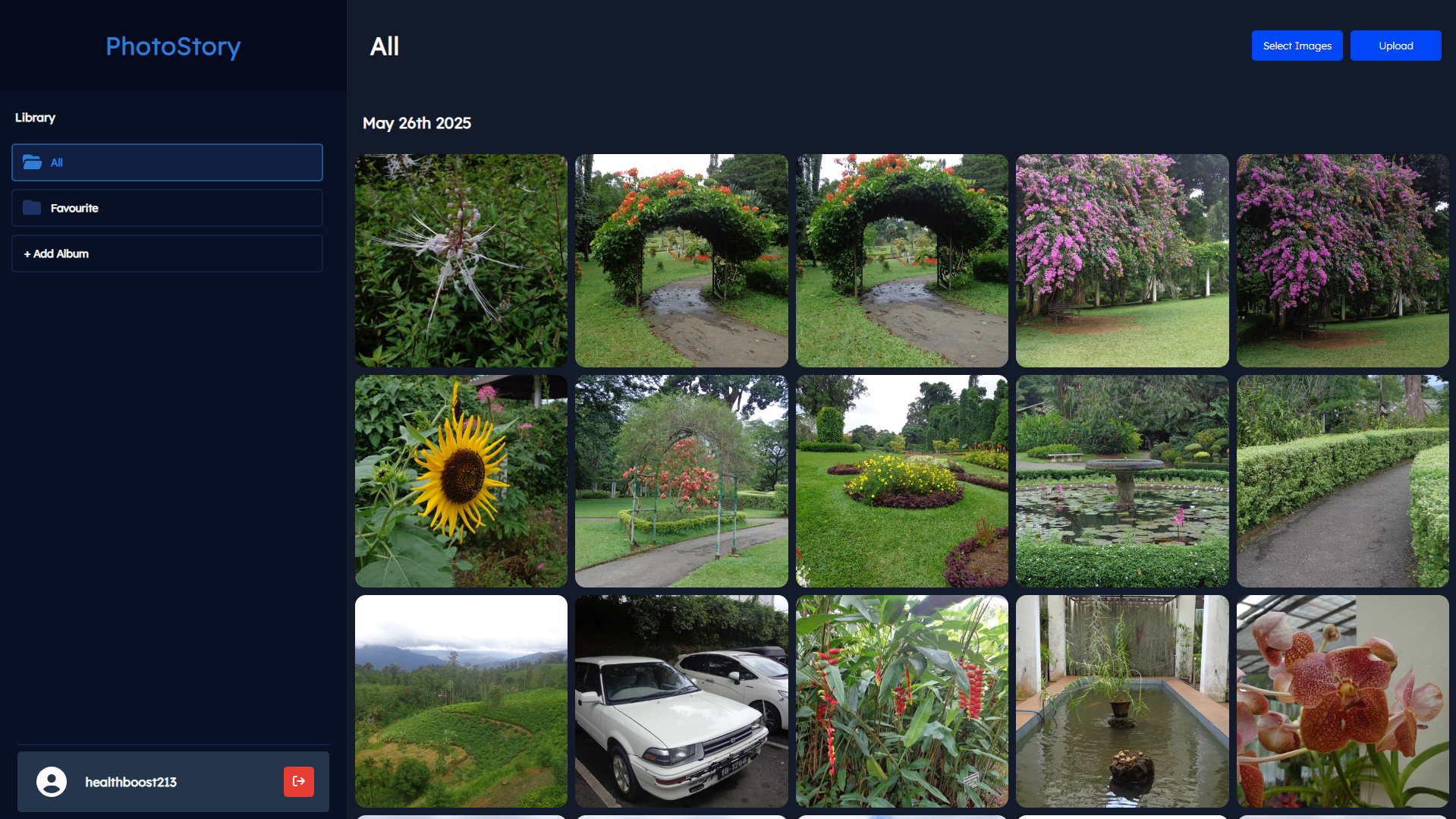
The solution to this was surprisingly simple but I got caught up overengineering some complex solution. I mixed arrays, dictionaries, sets, maps and all this nonsense when all I had to do was just go through the key-value pairs one by one, check if date exists, add the key to an object with an empty array and push the image there. Otherwise, just push to the current array. It was so simple and elegant, I'm shocked I didn't arrive at this answer much sooner.
The other issue now I had to solve was the formatting. This was pretty easy but it spawned a very ugly looking function with lines and lines of switch and case statements to select months and date suffixes. I don't even think you can refactor it to make it any simpler but I'm happy that I had at least gotten it out of the way.
Also if you noticed, I fixed some of the weird stretching that was there in the prior versions. I thought it was something to do with the backend but it was the CSS that was causing things to stretch out. I fixed the issue and images display perfectly now. A couple of grid bugs were also fixed that should hopefully make the UI feel more polished and complete.
Complete S3 Support
I've also taken time to make the S3 support complete. I had already abstracted the storage layer so I can use a slick dependency injection pattern to make the app work regardless of what storage backend the app uses. Funnily enough, The first bits of the project were built with S3 API support in mind. I wanted to build PhotoStory as a true cloud storage platform in the sense that the images aren't stored locally.
However, it kind of clashed with the philosophy that PhotoStory should be something that is easy to set-up and immediately usable without a large amount of configuration. Therefore, I decided to opt for local storage about halfway into development. Thankfully, the abstraction I had made earlier made it super easy to extend the application.
So What's Next?
Before I talk about what's next, I want to explore how far PhotoStory has come over the past 2 months of me developing and actively working on it. I'm quite happy that I was able to get the app to a workable state. It has pretty much all the features I wanted the app to have and a couple more that I didn't initially plan out or pushed off for the long-term. I've worked extremely hard to clear the short-term project goals and functionality additions off the list in the README.
So back to the topic at hand, there are still some nitty gritty stuff that I need to fix in the app. A few very important things are still missing. One of it is removing images from albums themselves. As of now, images delete themselves completely from the parent "All" album. All the pieces in the backend are in place but I just have to find a way to integrate it in the frontend.
After that, there is the database issues I talked about last week that need to be resolved. I'm planning to clear this out first next since this might be one of the easier problems to solve. There is only a single n+1 query left to fix and the TOCTOU bug is pretty insignificant. The problem with that is that there are many dialect specific solutions which could make it more difficult for the application to move to a different database later on if there was any architectural changes.
I also want to move the main gallery away from a static 1:1 set of images and make them maintain aspect ratio. I've analysed various different implementations and I have a rough idea of what I want to do but I don't really know if I want to implement it now exactly. I think I want to clear out a lot of the still pending problems and move with this since this is more of a nice to have then a necessity.
The most important thing that is still pending is writing a set-up guide. I guess if I want others to use my application, I would have to show others them the way. I am planning to make the app more focused on Linux since that's where I imagine most people using PhotoStory will be deploying to anyways. Eventually, I'm hoping to make a Docker configuration so people can just easily spin up a container but that's for the long run.
I have exams and stuff over the coming weeks so I highly doubt if I can make any big changes to PhotoStory. I've been wanting to spend more time writing articles for Monospace and stuff as well. I'm feeling quite burnt out working on code in general and wanted to take some time off to do something other than that. Anyways that's it for now.